

Choosing between MacBook Pro and MacBook Air has become more interesting following Apple’s October 2026 MacBook Pro announcements.
The new touchscreen MacBook Pro with PROLED XDR Display introduces advanced technology for demanding professional users, while the MacBook Air remains a product family associated with portability and mainstream computing.
But which Apple laptop makes more sense for students, business professionals, developers, and creative users?
MacBook Pro vs MacBook Air: The Main Difference
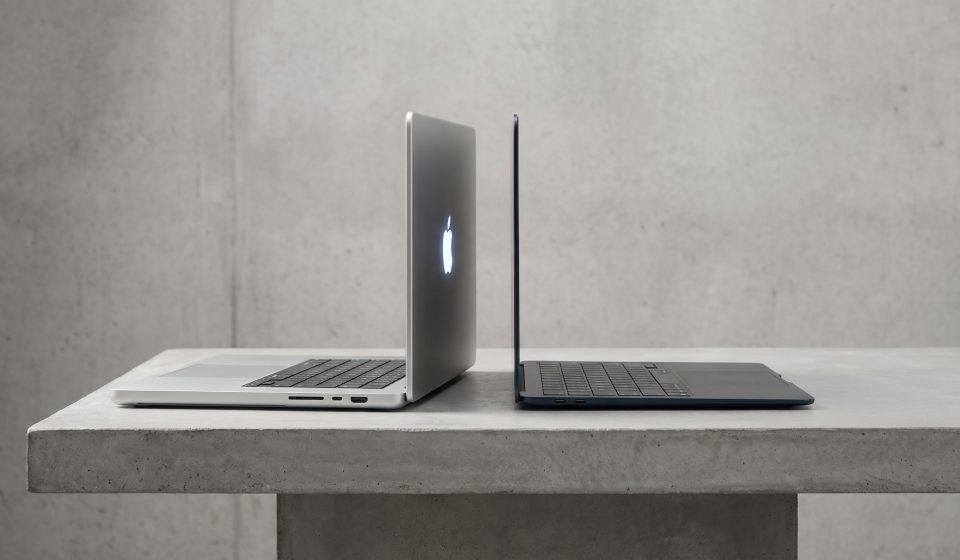
The MacBook Pro family is designed to accommodate more demanding professional workflows, while MacBook Air generally emphasizes portability and everyday computing.
However, buyers should compare specific generations and configurations rather than assuming every MacBook Pro is superior in every situation.
A MacBook Air with sufficient memory may be a better fit for a mobile office worker than a heavier, more expensive professional system.
Performance
MacBook Pro offers configurations designed for demanding tasks, including professional content creation, development, and complex computing workloads.
The October 2026 PROLED XDR models are available with M5 Pro and M5 Max processors.
MacBook Air configurations should be evaluated based on their actual chip generation, memory, and storage.
For everyday productivity, the additional computing resources of a high-end MacBook Pro may go unused.
Display Quality
Display technology is one of the strongest reasons to consider the new MacBook Pro.
The PROLED XDR touchscreen models offer tandem OLED technology, up to 2,000 nits of peak brightness, and advanced color capabilities.
These features may be valuable for professional photo editing, color grading, and visual design.
MacBook Air displays can still be suitable for everyday work, browsing, and general creative tasks.
Touchscreen Functionality
The October 2026 PROLED XDR MacBook Pro introduces direct-touch interaction.
Users can interact with supported content through gestures such as scrolling, zooming, and dragging.
Do not assume that MacBook Air has received the same touchscreen functionality without checking the exact model specifications.
Portability
MacBook Air has traditionally appealed to users who prioritize a lightweight computer for travel, study, and commuting.
Apple’s new MacBook Pro design is also lighter than previous professional models, with the 14-inch PROLED XDR version weighing approximately 3 pounds.
Nevertheless, portability should be evaluated alongside battery life, screen size, power requirements, and the accessories users carry.
MacBook Pro vs MacBook Air for Students
Many students can complete coursework, research, presentations, and routine programming on a suitably configured MacBook Air.
Students in disciplines involving advanced 3D work, large software projects, or specialized creative applications may benefit from MacBook Pro hardware.
Budget should remain an important consideration.
MacBook Pro vs MacBook Air for Developers
Developers should consider the tools they use.
Web development and general programming may not require the highest-end MacBook Pro.
Large projects, multiple virtual environments, and local AI models can create more demanding memory and performance requirements.
In many cases, selecting sufficient unified memory is more important than purchasing the most expensive processor tier.
MacBook Pro vs MacBook Air for Video Editing
Both laptop families can support creative workflows, depending on their configurations.
MacBook Pro becomes more attractive as project complexity increases, particularly for demanding effects, high-resolution footage, and color-sensitive work.
The new PROLED XDR display provides another reason for professional editors to consider the premium lineup.
MacBook Pro vs MacBook Air for Business
Business buyers should consider the applications employees use, required connectivity, device management, and total ownership costs.
For routine office work, a high-end MacBook Pro may not be necessary.
For employees running specialized professional applications, additional performance and memory may justify the expense.
When to Choose MacBook Air
MacBook Air may be the better choice when portability, everyday productivity, and budget are the main priorities.
It is worth considering for students, frequent travelers, and users who do not need advanced professional graphics or display features.
When to Choose MacBook Pro
MacBook Pro is worth considering when demanding applications, professional display requirements, or larger memory configurations are important.
The new touchscreen PROLED XDR models are especially interesting for professionals who can use their advanced display and touch capabilities.
Explore a MacBook Pro Configuration
For buyers considering a professional Apple laptop, AztekComputers lists the Apple MacBook Pro — MJLV4LL/A.
Review the exact specifications and current availability before comparing it with a MacBook Air.
This is an existing product listing and should not be confused with the newly announced touchscreen PROLED XDR models.
Final Verdict
MacBook Air is often a practical choice for portable everyday computing, while MacBook Pro provides options for more demanding professional work.
The best decision depends on software requirements, memory, display needs, portability, and budget.
For a more detailed look at professional configurations, read our MacBook Pro buying guide for developers, designers, and AI workloads.
Frequently Asked Questions
Is MacBook Pro better than MacBook Air?
MacBook Pro offers configurations for demanding work, but MacBook Air may be more suitable for users who prioritize portability and value.
Which is better for college students?
Many students can use MacBook Air effectively, while specialized courses may benefit from MacBook Pro performance.
Which is better for coding?
Both can be suitable. The best choice depends on development tools, project size, and memory requirements.
Does MacBook Air have the new PROLED XDR touchscreen?
The October 2026 announcement specifically introduced PROLED XDR touch on selected MacBook Pro models.
Which is better for video editing?
MacBook Pro may be more suitable for demanding professional editing and color-sensitive workflows.