


How to Prepare Your Business for Microsoft 365 Outages: Backup, Continuity and Recovery
The November 2026 Microsoft 365 outage is a reminder that even widely used cloud services can become temporarily unavailable. The disruption affected Exchange Online, Outlook, and selected Microsoft 365 features, interrupting business communication and workflows across multiple regions.
For organizations that rely on Microsoft 365 for email, collaboration, file access, and daily operations, an outage can create immediate challenges.
Employees may be unable to communicate with customers, access critical messages, schedule meetings, or complete automated processes.
Although businesses cannot control Microsoft’s internal infrastructure, they can prepare for service disruptions and reduce their operational impact.
This guide explains how to develop a practical Microsoft 365 business continuity strategy covering communication, backup, disaster recovery, networking, hardware, and employee procedures.
What Is Microsoft 365 Business Continuity?
Business continuity is the ability to maintain essential operations during an unexpected disruption.
For Microsoft 365 environments, continuity planning focuses on what happens when email, collaboration tools, cloud storage, or connected applications become unavailable.
A continuity plan identifies critical services, responsible employees, alternative workflows, and recovery priorities.
Its objective is not necessarily to keep every application functioning normally.
Instead, it aims to ensure that essential business activities can continue safely until normal service returns.
Why Microsoft 365 Outages Matter to Businesses
Many organizations use Microsoft 365 as a central platform for communication and collaboration.
Exchange Online may handle customer email, Teams may support internal coordination, SharePoint may store documents, and Power Automate may connect different workflows.
When one important service becomes unavailable, the impact can extend beyond the original application.
For example, an email outage may delay purchase orders, customer support responses, supplier confirmations, and internal approvals.
The November 2026 incident demonstrated how failures in shared infrastructure can affect multiple connected services.
1. Identify Critical Microsoft 365 Dependencies
The first step is understanding which business processes depend on Microsoft 365.
Create an inventory of important applications, integrations, and workflows.
Include email, calendars, shared mailboxes, document repositories, security tools, and automated processes.
For each dependency, identify the business owner, expected impact of downtime, and available alternatives.
This inventory helps organizations prioritize recovery and avoid wasting time on less important systems during an incident.
2. Define Recovery Priorities
Not every business process has the same urgency.
Customer service, order processing, payment operations, and emergency communication may require faster recovery than routine administrative tasks.
Organizations should define which activities must continue immediately and which can wait.
Two common planning concepts are recovery time objective and recovery point objective.
Recovery time objective describes how quickly a process should be restored after disruption.
Recovery point objective describes how much data loss, measured in time, the organization can tolerate.
These objectives help determine which backup and continuity measures are appropriate.
3. Establish Alternative Communication Channels
Businesses should not rely on a single email platform for every critical communication.
Maintain approved alternatives such as telephone systems, an independently hosted communication service, or another established business messaging platform.
Document when employees should switch to an alternative channel and who is authorized to make that decision.
Ensure contact information for important customers, suppliers, and internal stakeholders is available through an approved method that does not depend entirely on the affected Microsoft service.
Alternative communication should still follow company security and privacy policies.
4. Create an Email Outage Response Procedure
An email outage procedure should describe the steps employees and IT teams must follow when Outlook or Exchange Online becomes unavailable.
Start by confirming whether the problem is local or service-wide.
Check Microsoft Service Health and the Microsoft 365 admin center.
Notify employees through an approved channel and explain which operations are affected.
Identify urgent communications that must be handled outside email.
Document any customer requests or transactions that require follow-up after recovery.
When email returns, verify delivery and avoid sending duplicate messages unnecessarily.
5. Understand the Difference Between Backup and Availability
A backup is not the same as a high-availability solution.
Backups protect copies of data so they can be recovered when necessary.
High availability focuses on keeping services accessible despite failures.
A Microsoft 365 backup may help recover deleted or corrupted information, depending on the backup product and configuration.
However, it does not automatically restore Exchange Online when Microsoft’s infrastructure is unavailable.
Organizations should plan separately for data recovery and service continuity.
6. Evaluate Microsoft 365 Backup Requirements
Businesses should review which Microsoft 365 data needs additional protection.
Depending on the environment, this may include Exchange Online mailboxes, OneDrive files, SharePoint documents, and Teams-related information.
Evaluate Microsoft-native protection features and suitable third-party backup solutions.
Important considerations include retention policies, recovery capabilities, security, storage location, access controls, and regulatory obligations.
Do not assume that every backup product protects every Microsoft 365 data type equally.
Review vendor documentation carefully before purchasing.
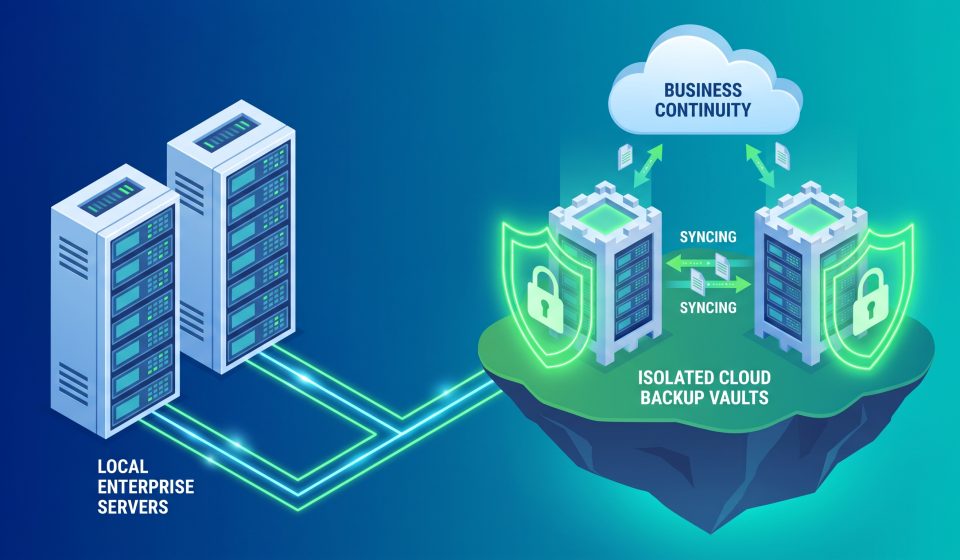
7. Follow the 3-2-1 Backup Principle Where Appropriate
The 3-2-1 backup principle recommends maintaining three copies of important data, using two types of storage, with one copy stored separately.
This is a useful general framework, although cloud environments may require different technical implementations.
Organizations should also consider immutable backups, restricted administrative access, and protection against ransomware.
The goal is to reduce the risk that one failure, compromised account, or storage problem affects every copy of critical information.
8. Consider NAS Storage for Local Business Data
Network-attached storage, or NAS, can provide centralized storage for approved local files and backup workflows.
Depending on the system, it may support scheduled backups, access controls, and storage redundancy.
However, NAS storage does not automatically provide a complete Microsoft 365 backup solution.
Cloud data protection requires appropriate software, permissions, and supported integration methods.
Organizations should also remember that RAID redundancy is not a substitute for independent backups.
Before purchasing NAS equipment, evaluate storage capacity, drive compatibility, security features, and recovery requirements.
9. Use UPS Systems for Local Power Protection
An uninterruptible power supply, or UPS, provides temporary power during certain electrical interruptions.
UPS systems can help protect servers, networking equipment, workstations, and storage devices from abrupt shutdowns.
This can reduce the risk of local data corruption and provide time for controlled shutdown procedures.
However, a UPS cannot restore Microsoft 365 cloud services during a remote outage.
Its role is to improve the reliability of local infrastructure.
When choosing a UPS, consider power capacity, runtime requirements, battery replacement, connected equipment, and management features.
10. Improve Network Reliability
Reliable networking supports access to cloud services and alternative communication tools.
Organizations should assess router performance, firewall configuration, switching infrastructure, and internet service reliability.
For businesses with critical connectivity requirements, a secondary internet connection may provide additional resilience.
However, redundant internet connections will not resolve an outage within Microsoft’s own infrastructure.
Network redundancy protects against certain local and provider connectivity failures rather than every possible cloud incident.
11. Prepare for Identity and Authentication Dependencies
Modern business applications frequently depend on centralized identity and authentication systems.
If employees cannot authenticate, they may lose access to services even when those services are otherwise functioning.
Organizations should document emergency administrative access procedures and review vendor-supported methods for maintaining appropriate access.
Emergency accounts should be protected, monitored, and tested according to established security guidance.
Do not weaken authentication requirements simply because an outage is inconvenient.
12. Protect Sensitive Business Information
Employees may be tempted to use personal email accounts, consumer file-sharing tools, or unapproved devices when corporate systems are unavailable.
These workarounds can create security and compliance risks.
A business continuity plan should clearly identify which alternative tools are permitted.
Employees should understand how to handle confidential information, customer records, credentials, and financial documents during an outage.
Approved emergency workflows should preserve appropriate access controls and auditability.
13. Prepare for Microsoft 365 Integration Failures
Businesses may use Microsoft 365 with customer relationship management platforms, ticketing systems, procurement software, and workflow automation tools.
When Exchange Online or Microsoft Graph becomes unavailable, connected processes may fail even when the main third-party application remains accessible.
Identify these integrations before an outage.
Document which processes can be paused safely, which require manual alternatives, and how failed operations will be reconciled after recovery.
14. Develop a Manual Operations Plan
Some essential activities may need to continue manually during a cloud disruption.
For example, customer support teams may record urgent requests through an approved alternative system.
Order processing teams may maintain controlled records of transactions that cannot immediately be synchronized.
These procedures should include clear ownership and reconciliation steps.
After service restoration, information should be entered into the normal systems carefully to avoid duplicate records or missed transactions.
15. Train Employees Before an Incident
A continuity plan is only useful if employees understand how to follow it.
Training should explain how to recognize a widespread outage, where to find official updates, which alternative tools are approved, and when to contact IT support.
Employees should also understand what not to do.
For example, they should not disable security controls, share passwords, or move confidential information into personal accounts.
Periodic exercises can help identify unclear procedures before a real incident occurs.
16. Test Backup and Recovery Procedures
Successful backup jobs do not guarantee that data can be restored when needed.
Organizations should periodically test recovery procedures using controlled, authorized methods.
Verify that backup data is complete, accessible to appropriate administrators, and recoverable within the required time.
Document test results and correct any identified weaknesses.
Testing is particularly important for critical email, customer records, and business documents.
17. Monitor Microsoft Service Health
IT teams should establish a process for monitoring Microsoft 365 service health advisories.
During an incident, record the relevant incident number, affected services, start time, updates, and business impact.
For the November 2026 outage, Microsoft used EX1550543 and MO1550821.
Official service health information should guide decisions about whether the organization is experiencing a vendor-side problem or a local technical issue.
18. Review the Incident After Recovery
After service returns, organizations should conduct a structured review.
Determine which processes were affected, how long the disruption lasted, and whether alternative procedures worked as intended.
Identify any customer communications, transactions, or administrative changes that require reconciliation.
Update the continuity plan based on actual experience.
Review Microsoft’s final incident findings when available, rather than relying only on early reports.
Business Continuity Hardware Checklist
| Hardware category | Potential benefit | Important limitation |
|---|---|---|
| UPS systems | Temporary power for local equipment | Cannot restore Microsoft cloud services |
| NAS storage | Centralized local storage and supported backup workflows | Requires appropriate backup configuration |
| Business routers | Reliable local networking | Cannot resolve remote service failures |
| Secondary internet equipment | Connectivity redundancy | Does not eliminate cloud provider outages |
| Business laptops | Flexible employee workstations | Still depend on accessible cloud services |
| External backup storage | Additional data protection options | Must be secured and tested |
Where to Research Business Continuity Equipment
Businesses planning local infrastructure improvements can explore hardware categories through AztekComputers.
Relevant products may include UPS systems, NAS devices, storage drives, networking equipment, and business computers.
However, hardware should be selected based on documented requirements rather than purchased simply because a cloud outage occurred.
For the latest incident details, read our Microsoft outage coverage.
Frequently Asked Questions
How can businesses prepare for Microsoft 365 outages?
Identify critical dependencies, establish alternative communication methods, maintain appropriate backups, document recovery procedures, and train employees.
Does Microsoft 365 backup prevent downtime?
No. Backup protects recoverable data but does not guarantee continuous access to Microsoft’s cloud services.
Can NAS storage back up Microsoft 365?
Some NAS systems support Microsoft 365 backup through compatible software, but capabilities vary by product and configuration.
Can a UPS prevent Microsoft outages?
No. A UPS protects local equipment from certain power interruptions, not failures in Microsoft’s remote infrastructure.
Should businesses maintain a second email provider?
An independently managed alternative communication arrangement may be useful, depending on business needs, security requirements, and operational complexity.
What is an email outage recovery plan?
It is a documented procedure for maintaining essential communication, monitoring recovery, and reconciling messages after email service is restored.
How often should backups be tested?
Testing frequency should reflect business risk, recovery objectives, regulatory obligations, and the importance of the protected data.
What should employees avoid during an outage?
They should avoid unapproved personal accounts, insecure file sharing, unnecessary configuration changes, and bypassing security controls.
Final Thoughts
Microsoft 365 outages cannot be eliminated by purchasing a single backup product, networking device, or power protection system.
Effective business continuity requires a combination of planning, secure alternative workflows, data protection, appropriate local infrastructure, and trained employees.
The November 2026 disruption provides an opportunity for organizations to review their dependence on cloud services and strengthen their readiness for future incidents.
For business technology and hardware guidance, visit AztekComputers and explore additional resources on the AztekComputers Blog.