

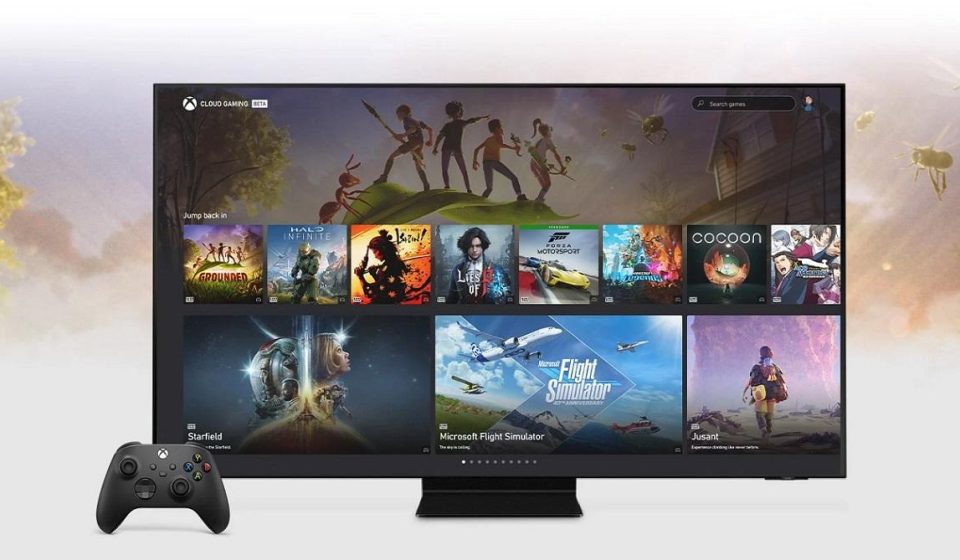

Xbox Cloud Gaming vs Xbox Game Pass: Plans, Costs and What You Actually Get in 2026
Xbox Cloud Gaming and Xbox Game Pass are closely connected, but they are not the same thing. Xbox Game Pass is a subscription service offering access to eligible game libraries and other benefits. Xbox Cloud Gaming is the technology and service that streams supported games over the internet to compatible devices.
Understanding that distinction has become more important in November 2026 because Microsoft is changing how cloud gaming time is included with its subscriptions.
Players now need to consider not only which games are available, but also how many hours they expect to stream each month and whether a recurring subscription is the most economical option.
This guide compares the services, explains Microsoft’s announced cloud-hour allowances, and helps readers understand which questions to ask before paying.
What Is the Difference Between Xbox Cloud Gaming and Game Pass?
Xbox Game Pass is a subscription product.
Depending on the plan, it can provide access to selected games, membership benefits, and cloud streaming.
Xbox Cloud Gaming is the streaming service used to play eligible games on supported devices without requiring the game to run locally.
The two overlap, but they are not interchangeable.
For example, a game may be available to install through a Game Pass benefit without being available for cloud streaming on every device.
Similarly, some supported games that a player owns may be eligible for cloud streaming even when they are not included in the Game Pass library.
Xbox Game Pass Plans in 2026
Microsoft’s current Xbox Game Pass lineup includes Essential, Premium, Ultimate, and a separate PC Game Pass offering.
The plans differ in game access, benefits, and cloud gaming eligibility.
For cloud gaming specifically, Microsoft’s published November 2026 policy identifies three subscription tiers with monthly included streaming hours.
| Plan | Announced cloud hours per month | General positioning |
|---|---|---|
| Game Pass Essential | 5 hours | Entry-level cloud access |
| Game Pass Premium | 10 hours | Mid-tier cloud access |
| Game Pass Ultimate | 15 hours | Highest included cloud-hour allowance |
| PC Game Pass | Cloud gaming not included | PC game subscription benefits |
These are the announced included allowances, not a guarantee that all users in every market have already transitioned to the new model.
Consult Microsoft’s cloud gaming changes announcement and current account terms before purchasing.
What Changed in November 2026?
Microsoft announced that Game Pass subscriptions would move to a model with set monthly cloud gaming allowances.
Previously, eligible subscribers could stream without these particular monthly hour limits.
Under the announced model, players receive a specified number of cloud hours depending on their plan.
When those hours are exhausted, Microsoft says users will be able to purchase additional cloud playtime.
The company also announced a separate option for purchasing cloud hours without subscribing to Game Pass.
Pricing, purchasing details, and market availability may differ.
Why Do Cloud Gaming Hours Matter?
A monthly allowance changes the value calculation for people who stream regularly.
Someone who plays only occasionally may find a small allowance sufficient.
A player who streams several hours every weekend may exceed an entry-level plan’s included hours.
For example, consider a player who expects to stream approximately two hours on each of eight days during a month.
That equals 16 hours of cloud gaming.
Under the announced allowances, this exceeds the included time of Essential, Premium, and Ultimate.
The player would need to consider additional cloud hours or a different way to play.
Example: How Much Cloud Gaming Time Do You Need?
| Gaming pattern | Estimated monthly hours | What to consider |
|---|---|---|
| One hour each weekend | 4–5 hours | Essential may be sufficient |
| Two hours each weekend | 8–10 hours | Premium may fit |
| Three hours each weekend | 12–15 hours | Ultimate may fit |
| One hour every day | 28–31 hours | Additional hours likely needed |
| Two hours every day | 56–62 hours | Compare substantial extra costs with local gaming |
These are illustrative usage calculations, not Microsoft pricing quotes.
Actual monthly usage varies with session length and how cloud playtime is counted under the applicable service rules.
Can You Buy Additional Cloud Gaming Hours?
Microsoft has announced the ability to purchase additional cloud playtime through the Xbox Store.
This gives subscribers an option to continue streaming after using their included allowance.
However, the total cost depends on the price of the additional hours and the number purchased.
Because prices and availability may differ by region and rollout stage, buyers should check the live Xbox Store rather than rely on an old article or an unsupported estimate.
Can You Use Xbox Cloud Gaming Without Game Pass?
Microsoft has announced a model allowing eligible players to purchase cloud playtime without maintaining a Game Pass subscription.
This can be useful for people who own supported games and only want to stream occasionally.
However, several conditions still apply.
The game must support cloud streaming, the player’s account must be eligible, and the device and region must be supported.
Purchased cloud time does not automatically include access to every game in the Xbox catalog.
Players should also distinguish between purchasing cloud hours and purchasing a game license.
What About Free-to-Play Games?
Microsoft supports selected free-to-play games through Xbox Cloud Gaming with a free Microsoft account in eligible regions.
Fortnite is one example identified in Microsoft’s official cloud gaming information.
However, free-to-play access is not a promise that every free game can be streamed without a subscription.
Check each title’s cloud eligibility and current access conditions.
Is PC Game Pass the Same as Cloud Gaming?
No.
PC Game Pass is focused on access to eligible PC games and related benefits.
Microsoft’s current cloud gaming terms explicitly state that Xbox Cloud Gaming is not included with PC Game Pass.
This distinction is particularly important for Windows users who assume that every Xbox-branded PC subscription automatically provides cloud streaming.
Before subscribing, review the exact plan name and the benefits listed on Microsoft’s checkout page.
Can You Stream Games You Already Own?
Yes, selected owned games can be streamed through Xbox Cloud Gaming when supported.
However, ownership alone is not enough.
The game must be cloud-playable, and the player must have the required streaming entitlement.
Some titles may be available through Game Pass, while others require a separate purchase.
The updated Xbox web library is designed to make eligible owned games and Game Pass titles easier to discover.
Does Xbox Cloud Gaming Replace an Xbox Console?
For some users, cloud gaming can reduce the need to purchase a console immediately.
It provides access to eligible games on devices they may already own.
However, it does not fully replace local hardware for every player.
Cloud gaming depends on internet availability and can have restrictions involving game catalogs, accessories, image quality, and playtime.
Dedicated consoles also provide local installation options and gaming experiences that do not depend on remote streaming for every session.
Xbox Cloud Gaming vs Local PC Gaming
Cloud gaming shifts the processing workload to remote infrastructure.
Local PC gaming uses the player’s own CPU, GPU, memory, and storage.
Cloud gaming can reduce initial hardware costs, but it introduces ongoing service dependencies and potential usage charges.
Local gaming may require more expensive hardware, but it can provide greater control over installed games, settings, peripherals, and offline access.
The better option depends on usage patterns, internet quality, game preferences, and total cost.
How to Compare the Total Cost
When evaluating Game Pass plans, consider more than the advertised monthly subscription price.
A realistic cost comparison should include:
- The subscription fee.
- Expected cloud gaming hours.
- Potential purchases of additional playtime.
- Any games purchased separately.
- Internet service and data usage.
- Controllers or other required accessories.
- The cost of alternative local gaming hardware.
A plan that looks inexpensive initially may become less attractive if a player frequently purchases additional hours.
Which Plan Makes Sense for Occasional Players?
Players who stream only a few hours each month may find a lower-tier plan or purchased cloud playtime sufficient.
However, the best choice depends on whether they also value the subscription’s game library and other benefits.
Someone who already owns the games they want to stream may evaluate the non-subscription option differently from someone who relies on Game Pass for game access.
Which Plan Makes Sense for Frequent Players?
Frequent cloud gamers should calculate their expected monthly hours before choosing a subscription.
Ultimate includes the largest announced cloud-hour allowance among the listed plans, but 15 hours may still be insufficient for someone who streams daily.
Additional cloud playtime costs could materially affect the monthly total.
For heavy users, local gaming hardware may deserve consideration as an alternative or supplement.
Does Internet Speed Affect Subscription Value?
Yes.
A subscription is less useful if the player’s connection cannot reliably support cloud streaming.
Microsoft recommends appropriate bandwidth, stable connectivity, and suitable devices.
Before committing to a long-term arrangement, test an eligible game where possible and assess connection quality.
High latency, packet loss, or restrictive data allowances can reduce the practical value of cloud gaming.
How to Avoid Choosing the Wrong Game Pass Plan
First, identify the games you want to play.
Second, check whether they are available for cloud streaming.
Third, estimate how many hours you will stream in a typical month.
Fourth, compare subscription benefits and any additional playtime costs.
Finally, confirm that your country and device are supported.
These steps are more reliable than selecting a plan based only on its name or advertised library size.
Where to Check Current Xbox Game Pass Prices
Use the official Xbox Game Pass website for current US pricing, subscription terms, and benefits.
Prices can change, promotional offers may be limited, and taxes can affect the final amount.
Microsoft’s cloud gaming information page also explains supported devices, access requirements, and regional restrictions.
Frequently Asked Questions
Is Xbox Cloud Gaming the same as Xbox Game Pass?
No. Game Pass is a subscription service, while Xbox Cloud Gaming is the streaming service used to play eligible games remotely.
How many cloud hours does Game Pass Ultimate include?
Microsoft announced 15 monthly included cloud hours beginning in November 2026, subject to applicable rollout terms.
How many hours does Premium include?
The announced allowance is 10 hours per month.
How many hours does Essential include?
The announced allowance is 5 hours per month.
Does PC Game Pass include cloud gaming?
Microsoft’s current terms state that Xbox Cloud Gaming is not included with PC Game Pass.
Can I use Xbox Cloud Gaming without a subscription?
Microsoft has announced purchased cloud playtime for eligible owned games. Certain free-to-play games also have separate access rules.
Can I stream every game I own?
No. Only selected games are eligible for cloud streaming.
Is Game Pass Ultimate always the best choice?
No. The appropriate option depends on your game preferences, monthly usage, and total cost.
Final Thoughts
The difference between Xbox Cloud Gaming and Xbox Game Pass is straightforward, but the purchasing decision has become more complex in 2026.
Microsoft’s new cloud-hour allowances mean players should evaluate how frequently they stream and whether additional playtime will be necessary.
For occasional users, a smaller allowance or purchased cloud hours may be sufficient. For frequent users, comparing total monthly spending with local gaming alternatives is especially important.
Always confirm the latest prices, benefits, and regional availability before subscribing.
Explore additional gaming technology coverage at the AztekComputers Blog.